Cubby Clipboard.
Find anything you copied, even words hidden inside screenshots
Windows clipboard manager with searchable history. Find screenshots by text inside them using offline OCR. No cloud, fully encrypted, works after restarts.
Rank
▲ #36Votes
65Platform
Web / MobileLaunched
Recently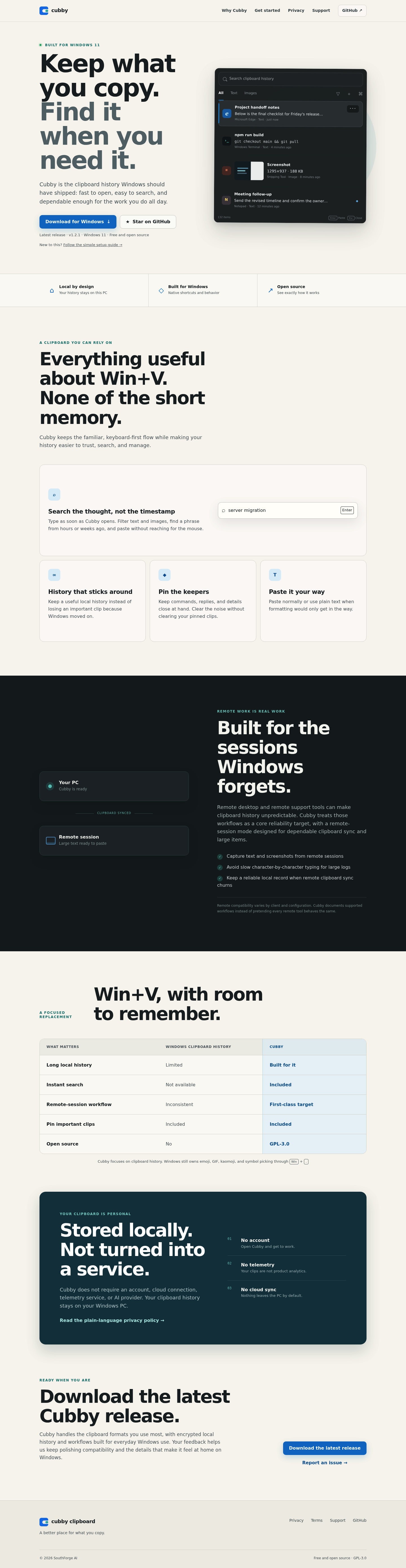
Favorite — quick open from Home.
More About Cubby Clipboard
Cubby Clipboard
Cubby Clipboard is a free, open-source clipboard history manager designed specifically for Windows 11. It replaces the limited native Win+V experience with a fast, searchable, and dependable tool that keeps your copied content accessible for as long as you need it.
Product Highlights
- Instant Search: Find any copied text or image by typing immediately after opening Cubby—no need to scroll through timestamps or use your mouse.
- Persistent Local History: Unlike Windows' built-in clipboard, Cubby retains your history over time so important clips never disappear automatically.
- Pin Important Items: Keep frequently used snippets, commands, and replies permanently accessible while clearing temporary clutter.
- Plain Text Pasting: Paste with or without formatting to avoid unwanted styling when you just need clean content.
- Remote Session Support: Designed for reliable clipboard sync in remote desktop environments, capturing large logs and screenshots without character-by-character delays.
- Privacy-First Design: No account, no cloud sync, no telemetry—your clipboard history stays encrypted and local to your PC.
Use Cases
- Daily Productivity: Developers, writers, and support professionals who copy frequently and need reliable access to previous clips without interruption.
- Remote Workflows: IT administrators and remote workers who depend on consistent clipboard behavior across RDP and remote support sessions.
- Sensitive Environments: Users in privacy-conscious organizations who require local-only data storage without third-party cloud dependencies.
Target Audience
Cubby Clipboard is built for Windows 11 power users who find the native clipboard history too limiting—particularly developers, IT professionals, and remote workers who need searchable, persistent, and trustworthy access to their copy history without compromising on privacy or performance.
You might also like
See all alternatives →