Cursor for iOS.
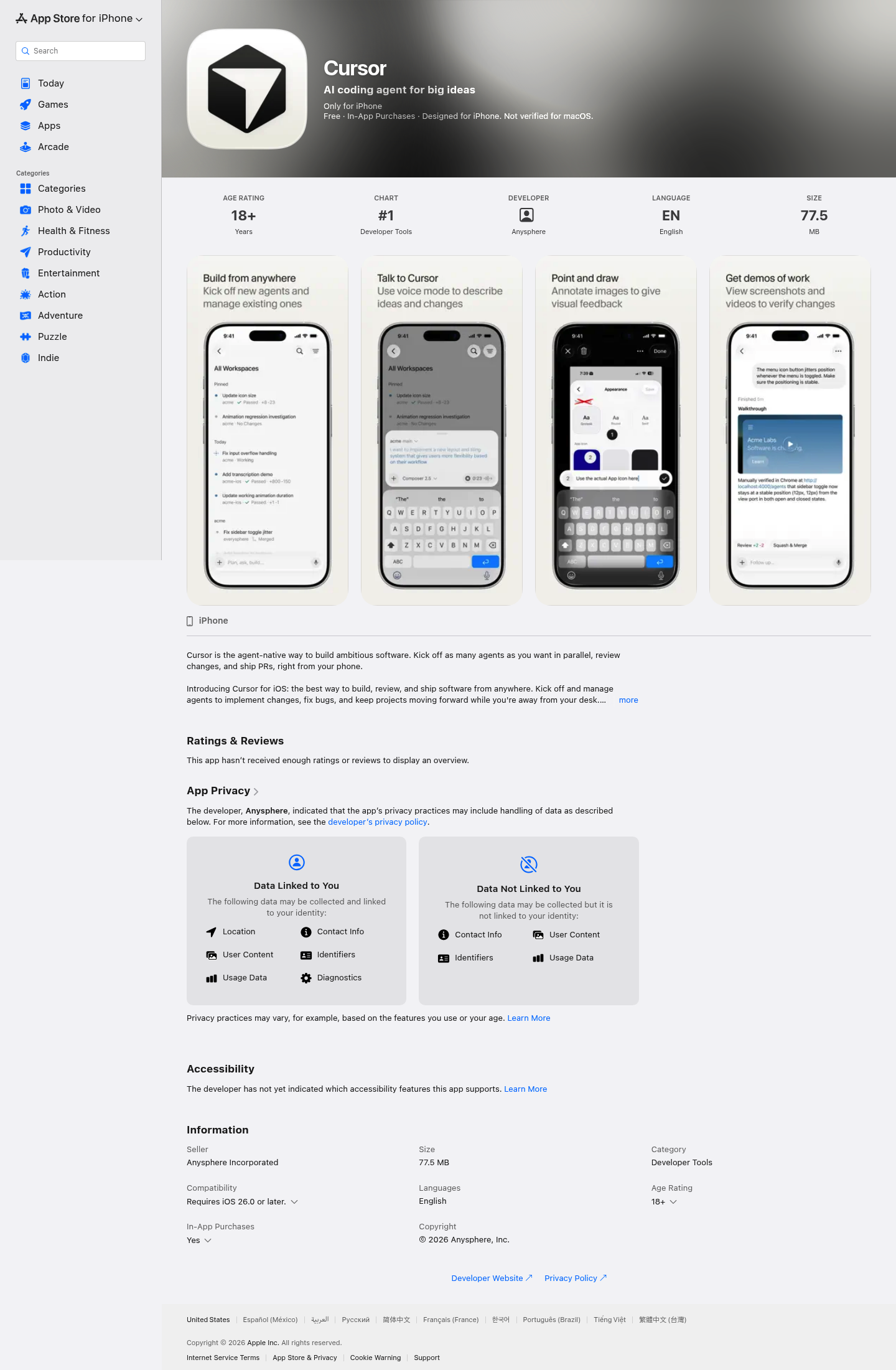
Download Cursor for iOS and code from anywhere. Launch cloud-based AI agents, control local agents remotely, and review code on the go.
More About Cursor for iOS
Cursor for iOS
Cursor for iOS brings the power of AI-driven software development to your pocket, enabling you to build, review, and ship code from anywhere. Whether inspiration strikes on your commute or you need to push a critical fix while away from your desk, this mobile-first coding agent transforms your iPhone into a complete development environment. By combining parallel agent execution, visual feedback tools, and voice-controlled interactions, Cursor for iOS eliminates the boundaries between mobile convenience and professional-grade software engineering.
Product Highlights
- Parallel Agent Execution: Launch and manage multiple coding agents simultaneously to implement features, fix bugs, and investigate issues without waiting for one task to complete
- Visual Feedback System: Take screenshots, circle problems, and add annotations directly on images to give agents precise visual context for UI fixes and design changes
- Sandboxed Testing Environment: Agents operate in isolated virtual machines with full development environments, producing videos, screenshots, and logs for thorough verification before creating merge-ready pull requests
- Voice-Powered Development: Use voice mode to brainstorm ideas, explain bugs, plan features, and request changes without typing—turning spoken conversations into actionable engineering work
- Mobile-Optimized Code Review: Inspect diffs, navigate between files and commits, and merge pull requests through a focused interface designed specifically for smaller screens
- Frontier Model Access: Choose from the best AI models available from OpenAI, Anthropic, Google, and Cursor's own Composer model, optimized for speed and token efficiency
Use Cases
- On-the-Go Development: Start new projects, implement features, and maintain momentum when away from your primary workstation—capture inspiration wherever it strikes
- Production Incident Response: Quickly investigate issues, deploy fixes, and merge emergency patches without needing laptop access during critical downtime situations
- Asynchronous Team Collaboration: Review agent-generated changes, provide visual feedback through annotated screenshots, and approve pull requests while traveling or in meetings
- Rapid UI Iteration: Circle visual bugs on screenshots, communicate design adjustments through drawn annotations, and verify fixes through agent-generated demo artifacts
- Codebase Exploration: Use voice queries to understand unfamiliar codebases faster, getting contextual explanations and navigation assistance without manual file digging
Target Audience
Cursor for iOS is built for professional software developers, engineering leads, and technical founders who need to maintain development velocity outside traditional office environments. It serves mobile-first developers, remote team members managing distributed workflows, and anyone who refuses to let physical location limit their ability to ship quality code.
You might also like
See all alternatives →