Flyout.
Quick-access rich-text notes for Mac. Slide from screen edge, create checklists, reminders, images & code blocks. Native macOS app with iCloud sync. Lifetime license.
More About Flyout
Flyout — Screen Edge Notes for macOS
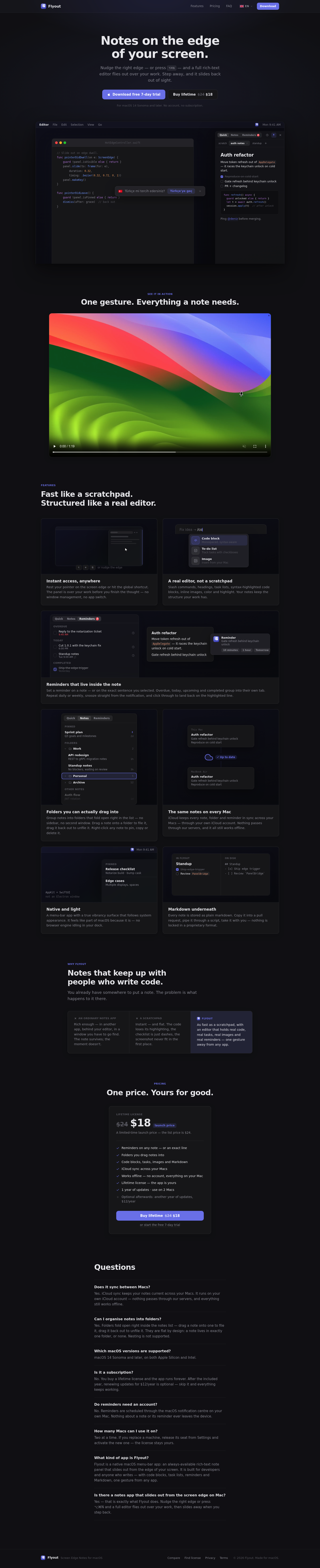
Flyout is a native macOS menu-bar app that puts a full rich-text editor at your screen's edge — one gesture away from any app. Nudge the right edge or press ⌥⌘N and your notes fly out over your work, then slide back out of sight when you step away. No window management, no app switching, no friction — just instant access to structured notes that keep up with how you actually work.
Product Highlights
- Instant Screen-Edge Access: Nudge your pointer against the right edge or use the global shortcut ⌥⌘N — the panel appears over your current window before you finish the thought.
- Real Editor, Not a Scratchpad: Slash commands, headings, task lists, syntax-highlighted code blocks, inline images, colors and highlights — your notes keep the structure your work demands.
- Inline Reminders: Set reminders on any note or specific line you select; overdue, today, upcoming and completed items group automatically with snooze and repeat options.
- Drag-Into Folders: Group notes into folders that fold open right in the list — no sidebar, no second window — drag to file, drag to unfile, right-click to pin, copy or delete.
- iCloud Sync Across Macs: All notes, folders and reminders stay in sync through your own iCloud account — nothing passes through external servers, everything works offline.
- Native macOS Build: True vibrancy surface that follows system appearance, built with AppKit and SwiftUI — no Electron, no browser engine idling in your dock.
- Markdown Underneath: Every note stores as plain Markdown — copy into pull requests, pipe through scripts, take anywhere — zero lock-in.
- Lifetime License, No Subscription: One purchase, yours forever — includes one year of updates, use on two Macs, optional $12/year renewal after that.
Use Cases
- Developer Quick Notes: Capture code snippets, API thoughts and debugging steps without leaving your IDE — syntax highlighting and code blocks preserve structure.
- Standup and Sprint Planning: Draft daily standup notes, track blockers and organize sprint goals with task lists and reminders that surface at the right time.
- Research and Writing: Jot ideas as they strike while reading documentation or drafting content — images, headings and formatting stay intact for later refinement.
- Cross-Machine Workflow: Start a note on your desktop Mac, pick it up on your MacBook Air — seamless iCloud sync keeps context alive across devices.
Target Audience
Flyout is built for developers, technical writers and productivity-focused macOS users who need structured note-taking without the friction of traditional apps — people who value speed, native performance and data ownership over feature bloat and subscription fatigue.
You might also like
See all alternatives →