
BugShot.
Capture bugs, logs & screenshots from Chrome's side panel. Auto-attach console, network data & environment. AI drafts reports. Free, no signup needed.
More About BugShot
BugShot
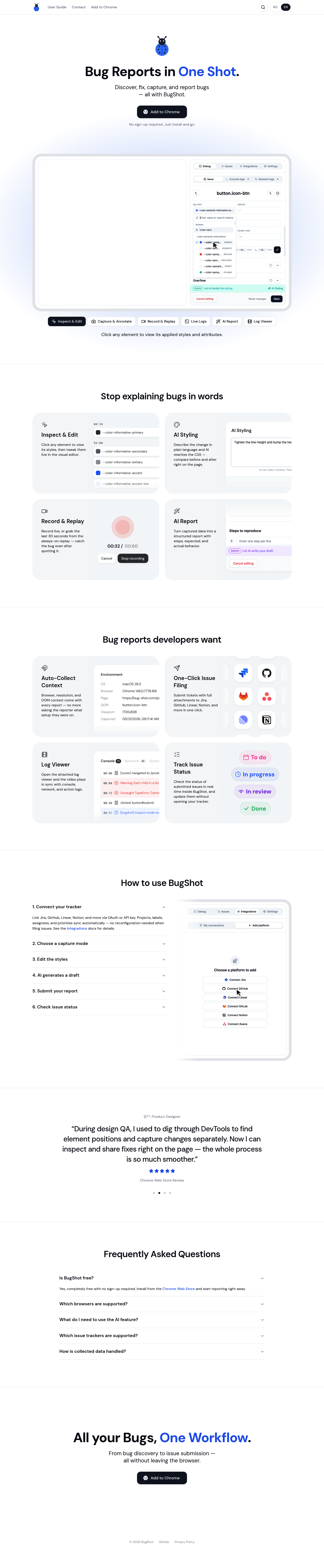
BugShot is a free Chrome extension that revolutionizes how teams capture, document, and report bugs. By combining visual inspection, AI-powered styling suggestions, screen recording, and one-click integrations with popular issue trackers, BugShot eliminates the friction of traditional bug reporting. No sign-up required—simply install and start creating comprehensive bug reports that developers actually want to receive.
Product Highlights
-
Visual Inspector: Click any element to instantly view its applied CSS styles and attributes, then edit them live in the built-in visual editor to test fixes on the spot.
-
AI-Powered Styling: Describe desired changes in plain language and let AI rewrite the CSS for you—compare before and after states directly on the page without manual coding.
-
Smart Recording: Capture bugs as they happen with live recording, or retrieve the last 30 seconds from the always-on replay buffer so you never miss reproducing an issue.
-
Auto-Generated Reports: Transform captured data into structured bug reports complete with reproduction steps, expected behavior, and actual results—no more writing lengthy explanations.
-
Rich Context Collection: Every report automatically includes browser version, screen resolution, and DOM context so developers get complete environment details upfront.
-
Seamless Integrations: File tickets with full attachments to Jira, GitHub, Linear, Notion, and other platforms in a single click—projects, labels, and assignees sync automatically.
-
Synchronized Log Viewer: Review console errors, network requests, and user actions in perfect sync with the recorded video for precise debugging.
-
Real-Time Issue Tracking: Monitor and update the status of submitted tickets directly within BugShot without switching between multiple tools.
Use Cases
-
QA Testing Workflows: QA engineers can inspect elements, record reproduction steps, and file detailed tickets without leaving the browser—reducing back-and-forth with developers by replacing text explanations with visual diffs and recordings.
-
Frontend Bug Triage: Product teams and developers can quickly validate UI issues by editing styles live, testing AI-suggested fixes, and immediately seeing the impact before committing code changes.
-
Cross-Platform Issue Reporting: Remote teams can capture complete bug context including environment details, screen recordings, and synchronized logs—ensuring developers receive everything needed to reproduce and resolve issues efficiently.
Target Audience
BugShot is designed for QA engineers, frontend developers, product managers, and design teams who need to communicate bugs clearly and efficiently. It serves professionals working in fast-paced agile environments where reducing friction in bug reporting directly translates to faster resolution times and improved product quality.
You might also like
See all alternatives →